MSP Team Accountability
Every MSP owner has lived this moment. You raise something in the team meeting, everyone nods, you get agreement around the table, and then a month later nothing has changed. The team said they’d adopt the new AI tools. The techs agreed to finish their timesheets every day. The engineers were on board with the ticketing process. But here you are again, having the same conversation.
Tenassia
3/13/20266 min read
Every MSP owner has lived this moment. You raise something in the team meeting, everyone nods, you get agreement around the table, and then a month later nothing has changed. The team said they’d adopt the new AI tools. The techs agreed to finish their timesheets every day. The engineers were on board with the ticketing process. But here you are again, having the same conversation.
In most cases the problem isn’t attitude. It’s the absence of visibility. When there’s nothing measuring whether something actually happened, it’s very easy for it not to happen. This article is about the practical systems that change that, drawn from my own experience running MSPs for 20 years and what I now see working with coaching clients through Tenassia.
What gets measured gets done
It’s one of those sayings that gets repeated so often it loses its weight. But in my experience running an MSP, there is nothing more true. If you want a behaviour to change, you have to make it visible.
A good example from Otto IT was around timesheet compliance. Technicians were required to complete their timesheets daily, targeting 80% efficiency, which works out to roughly six billable hours in a standard 7.6-hour day. This came up at monthly staff meetings, weekly team meetings, and in individual one-on-ones. We kept having the conversation and not much changed.
What finally shifted it was bringing the numbers into the daily stand-up. Each tech was asked to verbally report their billable hours from the previous day. That was it. When you’re standing next to a colleague reporting seven hours and you’re reporting three, you feel that. The peer pressure is healthy, it’s immediate, and it achieved in two weeks what months of one-on-ones couldn’t.
Designing metrics that can’t be gamed
I’ll be honest about something here. When I was an engineer, I treated KPI systems like puzzles. If there was a way to game the metric without doing the actual work, I’d find it. That experience shapes how I design these systems now.
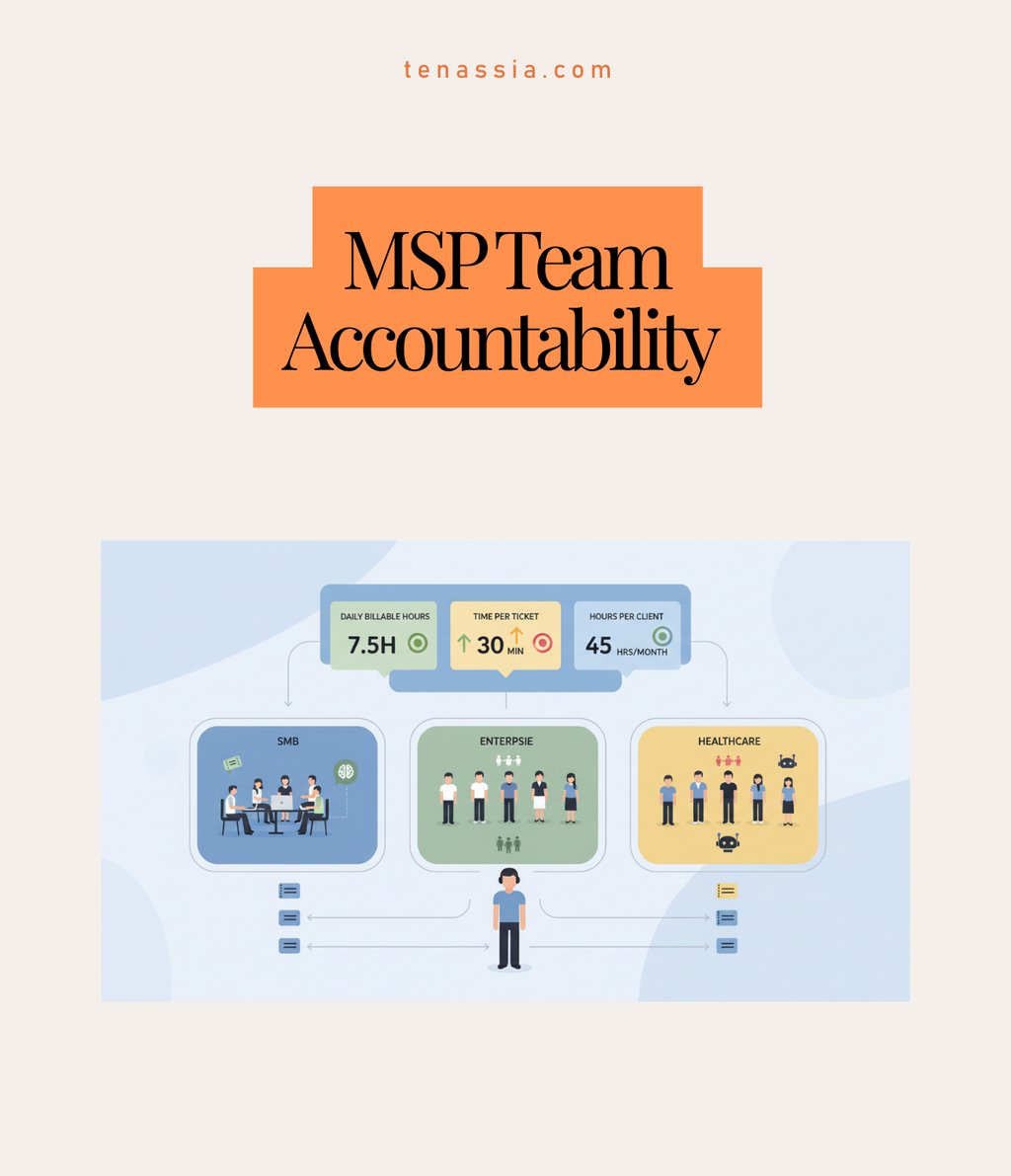
The answer is opposing metrics. You measure total billable hours per day to drive activity, but you cross-check it against average time per ticket to catch padding, and track total hours consumed per client to spot profitability problems. Any one of those metrics in isolation can be gamed. Used together, they make it very hard to optimise for the number without actually doing the work.
At DWM, where we had high enough ticket volume, we went even further and scheduled work in 30-minute blocks. Each tech started the day with 16 scheduled tickets. That structure removed the ambiguity entirely and made progress visible in real time.
What to make public and what to keep private
Transparency is the goal, but there’s a difference between visibility that motivates and visibility that demotivates or distorts behaviour. I learned this at Unisys when I was working as a service manager building performance dashboards for a professional services team.
Make public: total billable hours per tech per day and total hours consumed per client contract. The daily hours figure is comparable across the team and creates healthy accountability. The per-client figure creates awareness of profitability and helps the team understand why it matters when things blow out.
Keep private: time per individual ticket. The reason is variables. A Level 3 escalation engineer is always picking up tickets someone else has already spent 45 minutes on. Their time will always look worse. That’s not a performance issue, it’s the nature of the role. If you publish individual ticket times, what you actually get is cherry-picking. Your sharpest techs arrive early and grab the easy tickets, leaving the harder ones for whoever is less experienced. That compounds the problem rather than solving it.
The rule of thumb is this: you can hold people accountable to overall numbers when the work is comparable. When it isn’t, public accountability does more damage than good.
Sort out your ticket triage first
The single biggest mistake I see MSP owners make with team accountability is trying to fix the measurement without fixing the front end. If your tickets are incorrectly categorised before they hit the queue, no amount of dashboard transparency will save you.
My definition of a service desk ticket is pretty specific. It’s a problem the customer didn’t have yesterday. Something new that broke, or was working and now isn’t. Critically, we know what the problem is and we know how to fix it. We’re scheduling time and doing the work. If the problem is unknown, or the solution is unclear, that ticket doesn’t belong on the service desk. It goes straight to your escalation team.
When you mix those two types together and throw them into a shared pool, you end up with techs getting tickets they’re not equipped to handle. I’ve seen situations where someone spent eight hours resolving a PDF reader issue because the ticket was misallocated and the tech didn’t want to escalate. That’s not a people problem. It’s a system problem.
Retrofitting triage when you’re already in the mess
If this sounds familiar and you’re already in it, the move is to put a senior person on triage at the front end. I know that sounds counterintuitive. You don’t want your best tech stuck doing triage. But a senior person who can quickly identify the solution, attach the right documentation and assign the ticket to the right person unlocks an enormous amount of efficiency downstream. The cost of that triage role is almost always less than the cost of mis-assigned tickets.
The pod model: turning accountability into a team sport
The most significant structural change we made at Otto IT was moving from a flat team model to pods. Instead of one big group of technicians covering all customers, we created small self-contained teams of five to seven people, each responsible for a defined customer segment.
Each pod had the full mix: Level 1 and Level 2 technicians, a Level 3 escalation tech, a team leader, an account manager and a sales admin. They worked the same group of customers, built familiarity with those clients and competed as a team rather than as individuals.
The psychology shift was significant. When you compare pod versus pod instead of individual versus individual, peer accountability becomes collaborative rather than competitive. At Otto IT we had techs voluntarily staying back to help a struggling teammate close out their tickets, not because anyone told them to, but because the pod’s numbers were on the line. That kind of ownership is almost impossible to mandate from the top.
What happens when you don’t use pods
When DWM Solutions and Milan Industries merged to form Otto IT, the instinct was to mix everyone together. One big team, shared customers, everyone teaching each other. On paper it made sense. In practice it was a disaster. Customers were getting one of 15 possible technicians on any given call. Techs were getting tickets for technology stacks they’d never seen. Both the customer experience and the technician experience suffered within weeks.
Once we segmented by customer vertical, with financial services clients in one pod and accounting clients in another, both sides improved almost immediately. Each team got to build deep knowledge of five or six industries rather than being spread thin across fifteen.
Pod size and when to split
Five to seven people is the right size for a pod. Once you get to seven or eight, you start losing the tight team dynamic and it’s time to split. A few practical notes:
Twelve technicians gives you roughly two pods of six, once you account for leave cover
Resource conflicts between pods are manageable with a biweekly scheduling meeting involving both team leaders and the project manager
The initial concern that you’re duplicating resources is real, but the efficiency gains from pod specialisation more than offset it
Where to start
If you’re looking at all of this and wondering where to begin, here’s the sequence I’d recommend:
Define your ticket types. Establish a clear distinction between service desk tickets and escalation tickets before you do anything else.
Put a triage person on the front end. Get the routing right before anything else reaches the team.
Add verbal reporting to the daily stand-up. Keep it simple. Billable hours from the previous day, reported out loud.
Build in opposing metrics. Pair your activity measure with something that catches gaming.
Segment into pods once your headcount supports it. Group by customer vertical where possible.
Run pod versus pod, not individual versus individual.
Hold a biweekly scheduling meeting to manage resource sharing across pods.
The one thing that makes everything else easier
If I had to reduce all of this to a single principle, it would be transparency. Making sure everyone on the team understands their role, how it connects to the roles around them, and what happens downstream when they don’t follow through.
The metrics, the pods, the triage systems, the stand-ups, all of it is just a way of making the invisible visible. When people can see what’s actually happening, most of them step up. That’s been true in every team I’ve run and in most of the MSPs I now work with. Get that right and everything else becomes a lot easier.
Nick Clift founded Tenassia to help MSP owners running businesses between $2M and $10M build better businesses and, ultimately, exit on their own terms. He ran DWM Solutions and later Otto IT for 20 years before completing his own exit in July 2022.

Contact
Reach out anytime, we’re here to help.
pARTNERSHIP INQUIRIES
© 2026. All rights reserved.
MARKETING INQUIRIES
PO Box 1335, Kensington, VIC 3031